






How to Track Phone Calls From Your Website (2026 Guide)

Summarize this article with AI
If most of your leads arrive by phone, your website analytics are probably blind to them. A visitor lands on your site, reads your services page, and picks up the phone instead of filling out a form. In a default setup, that visit shows up as a bounce. The call that actually paid for itself never gets connected back to the page, the ad, or the keyword that produced it.
This guide covers four ways to close that gap, from free to paid: a click event on your tel: links, Google Ads call conversion tracking with a forwarding number, dynamic number insertion through a call tracking tool, and a simple "how did you hear about us" question logged in a CRM. Each one captures something different, and each one misses something too.
You will get exact steps for each method, a comparison table, a warning about a mistake that can hurt your Google Business Profile, and a short tools list.
Key Takeaways
- A tel: link click event in Google Analytics 4 tells you someone tapped your phone number. It does not tell you whether the call connected, how long it lasted, or whether it became a customer.
- Google's own documentation describes four event types in GA4: automatically collected, enhanced measurement, recommended, and custom. A phone click needs a custom event, because GA4 does not track it on its own.
- Google Ads call conversion tracking works through a Google forwarding number that swaps in only for visitors who clicked your ad, and only for up to 60 days per visitor, per Google's own Ads Help documentation.
- Google Ads lets you set a minimum call length so only calls that pass that threshold count as a conversion, filtering out accidental taps and quick hang-ups.
- Google's Business Profile guidelines say a listed phone number should be local, under the direct control of the business, and should not redirect to a different number. A call tracking number swapped onto your Business Profile as the primary number can violate that.
- Desktop visitors who write your number down and dial it by hand, and anyone who calls a number they already have saved, are invisible to every method in this guide except the last one.
- As of September 2026, CallRail's entry call tracking plan lists at $50 a month and WhatConverts's entry call tracking plan lists at $30 a month, both published on the vendors' own pricing pages.
What "Tracking Phone Calls From Your Website" Actually Means
It means connecting a phone call back to the page, campaign, or keyword that produced it, the same way a form submission gets connected to a landing page in your analytics. Without that connection, a service business whose leads arrive mainly by phone is optimizing a funnel it cannot fully see.
There is no single tool that does this perfectly. Each of the four methods below trades off cost against how much detail you get, and each one has a specific gap. Know the gap before you pick one, so you are not surprised later when a number does not add up.
Method 1: A tel: Link Click Event in GA4 (Free)
This is the cheapest starting point and the one every service business site should have, even if you add a paid tool later.
Here is what it does: every time a visitor taps or clicks a phone number formatted as a real link (a tel: link, not plain text), it fires an event to Google Analytics 4. You see the count in your GA4 reports, broken down by page, source, and campaign, the same way you would see a form submission.
According to Google's own About events help page, GA4 has four kinds of events: automatically collected, enhanced measurement, recommended, and custom. A phone number click is not one of the automatically collected or enhanced measurement events, so you need to set it up as a custom event yourself.
Steps if you are comfortable editing your site's code:
- Make sure every phone number on your site is a real tel: link, not just text.
- Add a small script that listens for clicks on those links and sends a custom event using the gtag event pattern documented on Google's Set up events developer page.
- In GA4, go to Admin, then Data display, then Events, find your new event, and turn on the "Mark as key event" toggle so it counts in your conversion reporting.
Steps if you use Google Tag Manager instead of hand-editing code:
- In GTM, create a new trigger and choose the Click, Just Links trigger type, which Google's Click trigger help page describes as a way to track clicks on HTML link elements.
- Set the trigger to fire on "Some Link Clicks" where the Click URL contains tel:, so it only fires on phone links and not every link on the page.
- Build a GA4 Event tag that fires on that trigger, sends an event named something like phone_click, and publish the container.
- Back in GA4, mark that event as a key event the same way as above.
What this method does not capture: it counts taps, not completed calls. A visitor can tap your number, see it, and never actually place the call, or place it and hang up in two seconds. It also cannot see a desktop visitor who reads your number on screen and dials it by hand on a separate phone, since there is no click to record. Treat this number as an interest signal, not a call count.
Method 2: Google Ads Call Conversions and Forwarding Numbers (Free to Set Up, Ties to Paid Ads)
If you run Google Ads and most of your conversions happen by phone, this closes a real gap: it tells you which ads, keywords, and campaigns are producing calls, not just clicks.
Here is how it works, according to Google's own Google Ads Help page on tracking calls to a phone number on a website. You install the Google tag (gtag.js) plus a phone conversion snippet on the pages where your number appears. When someone who clicked your ad lands on your site, that snippet swaps your displayed number for a dynamically generated Google forwarding number, at no extra cost to you. When that visitor calls the forwarding number, Google Ads logs it as a call, attributes it to the ad and keyword that brought the visitor in, and routes the call through to your real number.
Two details matter for accuracy:
- Minimum call length. Google Ads lets you set a minimum duration so that a call only counts as a conversion once it passes that length, filtering out accidental taps and calls that hang up before anyone talks.
- The swap is temporary and personal. Per Google's Google forwarding number help page, the forwarding number is shown only to that specific visitor, stays active for up to 60 days from their first visit, and resets each time they call again inside that window. Nobody else sees your ad-tracking number as your general listed number.
Steps to set it up:
- In Google Ads, create a new conversion action under Conversions, and choose "Calls from your website."
- Set your minimum call length, based on how long a real sales conversation usually takes for your business.
- Install the Google tag and the phone conversion snippet on every page that shows your number.
- Confirm the forwarding number appears correctly by clicking your own ad and checking the number that loads.
What this method does not capture: it only tracks calls from people who came through a paid Google ad click. Organic search visitors, direct visitors, and anyone who calls from memory or a saved contact are outside its view entirely. It also tells you nothing about calls that start from a page a visitor reached without clicking an ad in the first place.
Method 3: Dynamic Number Insertion With a Call Tracking Tool (Paid)
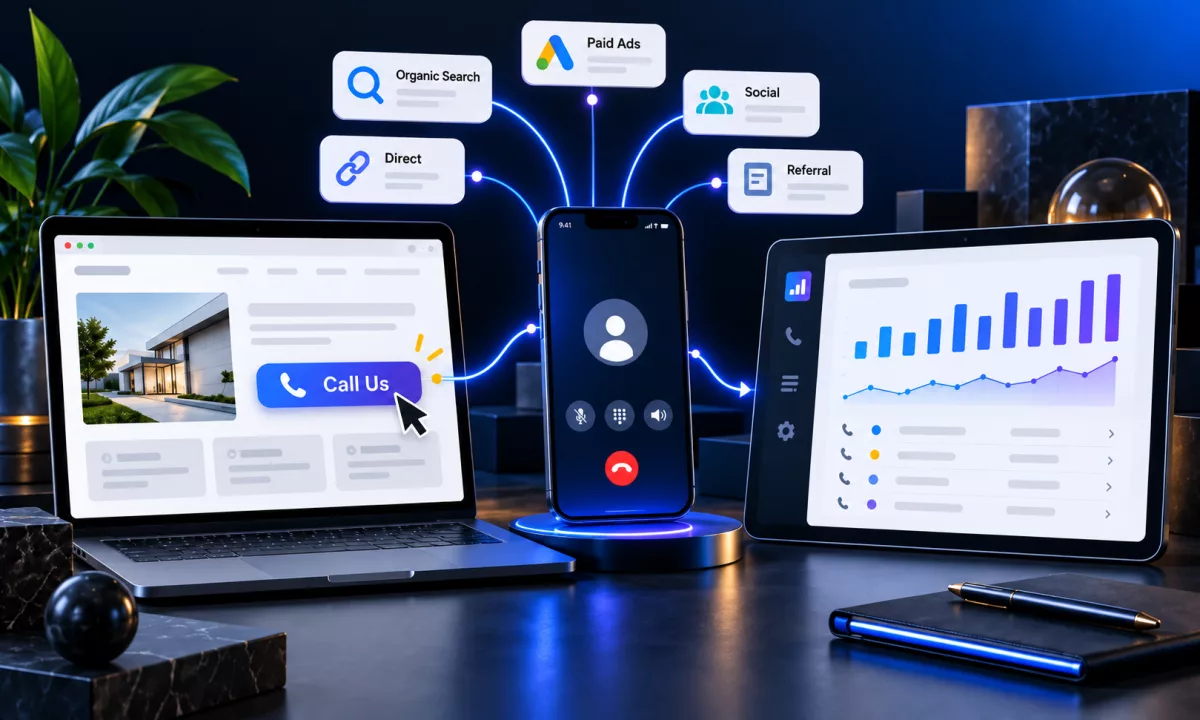
This is the method that gives you the most detail, and it is what most call tracking software is built around. Dynamic number insertion (DNI) works like the Google Ads forwarding number above, but for every traffic source, not just paid ads.
Here is how it works: the tool assigns a pool of phone numbers to your account. When a visitor lands on your site, a script checks how they arrived (which search engine, which ad, which referral link, or a first-time visitor with no source) and swaps your displayed number for a different tracking number based on that source. The number that visitor sees might be different from the number someone who arrived through organic search sees, even on the same page at the same time. When they call, the tool logs the source, the page, the call recording, and the duration, and can push that data into GA4 or your ad accounts as a conversion.
Two vendors that offer this: CallRail and WhatConverts. Their published pricing, as of September 2026:
- CallRail's pricing page lists a Lead Tracking plan starting at $50 a month with 5 phone numbers and 250 minutes included, plus higher tiers that add form tracking and conversation analytics.
- WhatConverts's pricing page lists a Call Tracking plan starting at $30 a month with a usage credit included, plus higher tiers that add form and chat tracking, call routing, and a custom report builder.
Steps to set it up, in general terms since each tool's dashboard differs:
- Sign up and connect the tool to your website, usually with a JavaScript snippet in your site header.
- Assign a pool of tracking numbers for your paid, organic, and direct traffic (and any other sources you want split out).
- Set your real business number as the number shown to visitors who arrive with no numbers left to assign, so nobody ever sees a broken or blank number.
- Connect the tool's integration to GA4 and your ad platforms so calls flow into your existing reports instead of living in a separate dashboard.
A warning before you turn this on: never let a call tracking number become the phone number listed on your Google Business Profile. Google's own Business Profile guideline on phone numbers says to use a local number under the direct control of the business, and not to list a number that redirects or refers callers somewhere else. A swapped tracking number showing up as your primary listed number is exactly the kind of inconsistency that guideline is written against, and it can put your listing at risk. Keep your real business number on your Google Business Profile, your directory listings, and anywhere else your NAP (name, address, phone) needs to match. Reserve dynamic tracking numbers for your own website, where you control what each visitor sees.
What this method does not capture: it only sees calls placed to a swapped tracking number. A visitor who bookmarks your real number, saves it from a past visit, or gets it from a business card, a truck, or a print ad without going through your tracked website flow will call your real number directly, and that call will not appear in the tool at all.
Method 4: Ask "How Did You Hear About Us" and Log It in a CRM (Free to Low Cost)
This is the oldest method and the only one on this list that can catch a call none of the others see, because it does not depend on a swapped number or a click at all.
Here is how it works: whoever answers the phone asks the caller how they found the business, then logs the answer against that customer's record in a CRM. Over time, that log gives you a rough picture of which channels are producing calls, even the ones that started with someone writing your number down from a truck or a friend's recommendation.
Steps to run this well:
- Add one required field to your intake process: "How did you hear about us?" with a short list of options (Google search, Google Maps, a friend, a truck or sign, social media, other).
- Train whoever answers the phone to ask it on every call, not just the ones that sound like new business.
- Log the answer in a CRM instead of a sticky note, so it can be counted and reported on instead of forgotten.
- Review the log monthly next to your other tracking methods, and look for gaps where a channel shows up here but not in your website or ad data.
If you do not have a CRM in place, or the one you have does not talk to your website, a custom CRM or dashboard can pull that intake question straight into your reporting alongside your form and call data instead of sitting in a separate spreadsheet.
What this method does not capture: it depends entirely on the staff member asking the question and the caller answering it honestly and specifically. A rushed answer of "I found you online" tells you nothing about which page, ad, or search term actually worked. It also will not catch a call the staff member forgot to log.
Which Method Should You Use?
Most service businesses end up running more than one of these at once. The table below shows what each one costs, what it captures, and what it misses.
| Method | Cost | What it captures | What it misses |
|---|---|---|---|
| tel: link click event in GA4 | Free | Taps on your phone number, by page and traffic source | Whether the call connected, its length, or whether it converted; misses hand-dialed numbers entirely |
| Google Ads call conversions | Free to set up (ties to your ad spend) | Calls from visitors who clicked a Google ad, attributed to the keyword and campaign, filtered by minimum call length | Organic, direct, and word-of-mouth calls; anyone who did not click a Google ad |
| Dynamic number insertion (call tracking tool) | Paid, from about $30 to $50 a month for an entry plan as of September 2026 | Calls across every tracked traffic source, with recordings and duration, pushed into GA4 and ad platforms | Calls to your real number that bypassed the tracked website flow (saved contacts, print, signage) |
| "How did you hear about us" logged in a CRM | Free to low cost (whatever your CRM costs) | Self-reported source for every call, including ones no digital method can see | Accuracy and detail; depends on staff consistency and caller honesty |
Common Mistakes
- Listing a call tracking number as your Google Business Profile number. The fix: keep your real, local number on your Business Profile and every directory listing. Use dynamic tracking numbers only on your own website, where the swap is invisible to Google's NAP checks.
- Treating a tel: link click as a completed call. The fix: report it as "phone number taps," not "calls," and pair it with a real call tracking method before making budget decisions off it alone.
- Setting no minimum call length on Google Ads call conversions. The fix: set a minimum length that matches how long your real sales conversations run, so a two-second accidental dial does not count as a conversion.
- Running a call tracking tool but never connecting it to GA4 or your ad accounts. The fix: use the tool's integration so calls show up next to your other conversions instead of living in a dashboard nobody checks.
- Skipping "how did you hear about us" because you have call tracking software. The fix: keep asking anyway. It is the only method that catches calls to a saved number or a number from a truck or sign.
Tools
| Tool | Primary use |
|---|---|
| Google Analytics 4 | Custom event tracking for tel: link clicks, marked as a key event |
| Google Tag Manager | Publishing a click trigger for tel: links without editing site code directly |
| Google Ads | Call conversion tracking from ad clicks, with a forwarding number and minimum call length |
| CallRail | Dynamic number insertion, call recording, and source-level call tracking |
| WhatConverts | Dynamic number insertion plus form and chat tracking in one dashboard |
| A CRM connected to your website | Logging "how did you hear about us" answers against each customer record |
If your ad accounts and call data live in different places, our ads management team can wire call conversions into the campaigns that are actually driving them, and our Google Business Profile and local SEO service can check that your listed number matches everywhere it needs to before a tracking number ever gets set up.
FAQs
Add a custom GA4 event that fires when a visitor clicks a tel: link, then mark that event as a key event in GA4's Admin, Data display, Events screen. It is free and takes an afternoon to set up, but it only counts taps, not completed calls, so pair it with Google Ads call conversion tracking if you also run paid search.
No. Google's own documentation on events describes automatically collected and enhanced measurement events, and a phone number click is neither. You have to set it up yourself as a custom event, either by editing your site's code or through Google Tag Manager's Click trigger.
It depends on what you need. If you only need call tracking, WhatConverts's entry plan lists at $30 a month and CallRail's entry plan lists at $50 a month, both as of September 2026, with CallRail's plan including more numbers and minutes by default. If you also want form and chat tracking in the same tool, compare the Plus tiers on both vendors' pricing pages, since features and included usage change over time.
It can, if you list that number as your Business Profile's primary phone number. Google's Business Profile guideline on phone numbers calls for a local number under the direct control of the business, and says not to list a number that redirects or refers callers elsewhere. Keep your real number on your Business Profile and use dynamic tracking numbers only on your website.
Create a new conversion action in Google Ads under Conversions and choose "Calls from your website," set a minimum call length, then install the Google tag and phone conversion snippet on the pages where your number appears. Google swaps in a forwarding number for visitors who clicked your ad and reports back the call length, campaign, and keyword.
Because each tracking method sees a different slice of your calls. A tel: link event only sees taps on your site. Google Ads call conversions only see calls from ad clicks. A call tracking tool only sees calls to a swapped tracking number. Someone who calls your real number from a saved contact or a business card will not appear in any of them, which is why asking "how did you hear about us" still matters even after you set up the digital methods.
Conclusion
Start with the free tel: link event in GA4 so you have some signal today, add Google Ads call conversion tracking if you run paid search, and move to a dynamic number insertion tool once phone leads are worth enough that the gaps in the free methods start costing you real budget decisions. Keep asking "how did you hear about us" the whole time, because it is the only method that catches the calls the others cannot see.
Whichever combination you choose, keep your real business number consistent everywhere Google can see it, and reserve tracking numbers for your own site.
If your website, CRM, and ad accounts are not set up to report on calls the way this guide describes, get started with Rankwyre and we will scope what it takes to connect them.
About the author:
Rankwyre Team
Digital technology company, Miami, Florida
Rankwyre is a digital technology company based in Miami, Florida. It builds custom websites, ecommerce stores, web apps, CRM systems, and dashboards, then runs the SEO and ads that bring in customers.